
Microsoft 365 Messaging Exam (MS-203) - Microsoft Exam Questions
Last updated on June 22, 2026
to join the discussion
No discussions yet. Be the first to ask!
Delete Comment
Are you sure? This action cannot be undone.
What should you do?
to join the discussion
No discussions yet. Be the first to ask!
Delete Comment
Are you sure? This action cannot be undone.
NOTE: Each correct selection is worth one point.
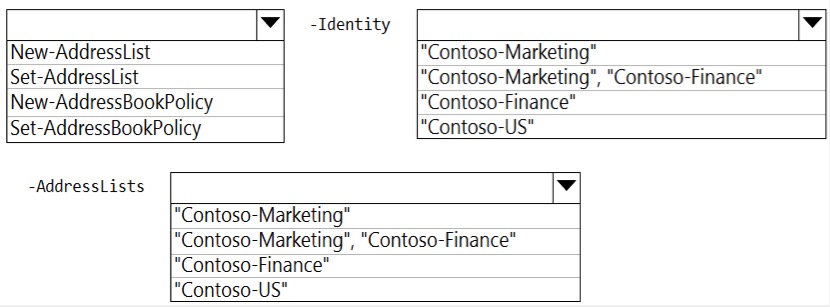
area.
to join the discussion
No discussions yet. Be the first to ask!
Delete Comment
Are you sure? This action cannot be undone.
Use the following login credentials as needed: To enter your username, place your cursor in the Sign in box and click on the username below. below. To enter your password, place your cursor in the Enter password box and click on the password Microsoft 365 Username: admin@abc.com Microsoft 365 Password: xxxxxx
If the Microsoft 365 portal does not load successfully in the browser, press CTRL-K to reload the
portal in a new browser tab. The following information is for technical support purposes only. Lab Instance: XXXXXX You need to ensure that all emails sent from the users in your company to recipients who use a suffix of @fabnkam.com are encrypted by using Microsoft Office 365 Message Encryption (OME). To complete this task, sign in to the Exchange admin center.
to join the discussion
No discussions yet. Be the first to ask!
Delete Comment
Are you sure? This action cannot be undone.
to join the discussion
No discussions yet. Be the first to ask!
Delete Comment
Are you sure? This action cannot be undone.
Finish Practice?
Are you sure you want to finish? This will end your practice session.