
Microsoft Security Operations Analyst (SC-200) - Microsoft Exam Questions
Last updated on June 22, 2026
Which two actions should you perform in the Cloud App Security portal? Each correct answer presents part of the solution.
NOTE: Each correct selection is worth one point.
Automatically scan new files for Azure Information Protection classification labels and content inspection warnings
Only scan files for Azure Information Protection classification labels and content inspection warnings
from this tenant
to join the discussion
No discussions yet. Be the first to ask!
Delete Comment
Are you sure? This action cannot be undone.
• Ensure that members of Group1 can run prompts and respond to Microsoft Defender XDR security
incidents.
• Ensure that members of Group2 can run prompts.
• Follow the principle of least privilege.
You remove Everyone from the Copilot Contributor role.
Which two actions should you perform next? Each correct answer presents part of the solution.
NOTE: Each correct selection is worth one point.
to join the discussion
No discussions yet. Be the first to ask!
Delete Comment
Are you sure? This action cannot be undone.
to join the discussion
No discussions yet. Be the first to ask!
Delete Comment
Are you sure? This action cannot be undone.
What are two possible causes of the failures? Each correct answer presents part of the solution.
NOTE: Each correct selection is worth one point.
to join the discussion
No discussions yet. Be the first to ask!
Delete Comment
Are you sure? This action cannot be undone.


Home > Azure Sentinel workspaces > Azure Sentinel Analytics rule wizard - Edit existing rule General Set rule logic Incident settings Automated response Review and create Define the logic for your new analytics rule. Rule query Any time details set here will be within the scope defined below in the Query scheduling fields. Query scheduling AzureActivity
I where OperationName -- "Create or Update Virtual Machine"
or OperationName = "Create Deployment"
I where ActivityStatus - "Succeeded" I make-series dcount (ResourceId) default=0 on EventSubmissionTinestamp in range (ago (7d), now(), 1d) by Caller View sue D Map entities Map the entities recognized by Azure Sentinel to the appropriate columns available in your query results. This enables Azure Sentinel to recognize the entities that are part of the alerts for further analysis. Entity type must be a string. Entity Type Column Account Choose column Host Choose column IP Choose column URL Choose column FileHash Choose column Add Add Add Add Add Run query every • 5 Minutes Lookup data from the last* © Alert threshold Generate alert when number of query resuits Is greater than Event grouping Configure how rule query results are grouped into alerts
• Group all events into a single alert
• Trigger an alert for each event
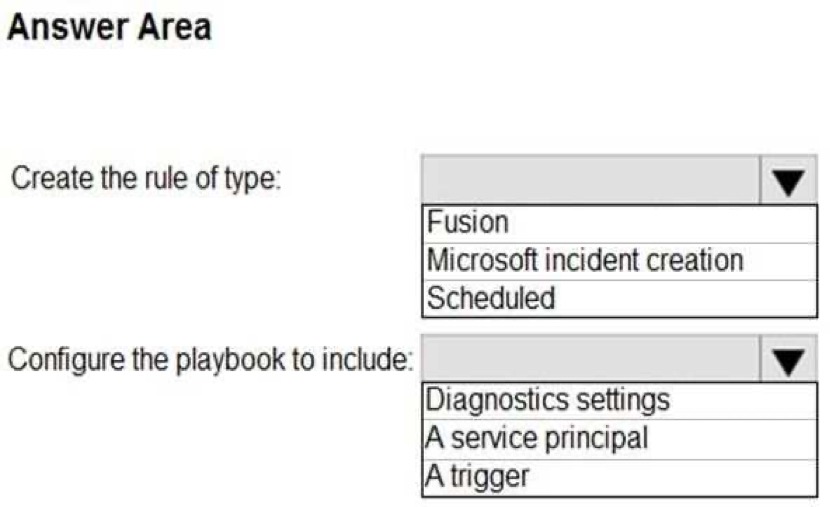
Suppression Stop running query after alert is generated © On Off Stop running query for* 5 Hours 5 Hours Previous Next: Incident settings> You do NOT define any incident settings as part of the rule definition. Use the drop-down menus to select the answer choice that completes each statement based on the information presented in the graphic.
NOTE: Each correct selection is worth one point.
to join the discussion
No discussions yet. Be the first to ask!
Delete Comment
Are you sure? This action cannot be undone.
Finish Practice?
Are you sure you want to finish? This will end your practice session.