
Qlik Sense System Administrator Certification Exam – June 2018 Release Exam (QSSA2018) - QlikView Exam Questions
Last updated on June 20, 2026
Which steps should a system administrator take to efficiently complete this task? A.
1. Change the app owner to the user to make changes
2. Add the Accounting tag to the app
3. Move the app to the Accounting stream
B.
1. Give the user permissions to make changes to the app
2. Move the app to the Accounting Stream
C.
1. Export the app to a location for the user to make the changes using Qlik Sense Desktop
2. Import the app back using QMC after the changes have been made
3. Publish the app to the Accounting stream
D. 1Change the app owner to the user to make changes
2Move the app to the Accountings stream
to join the discussion
No discussions yet. Be the first to ask!
Delete Comment
Are you sure? This action cannot be undone.
What is causing this issue with the reload on the server?
to join the discussion
No discussions yet. Be the first to ask!
Delete Comment
Are you sure? This action cannot be undone.
Which throe slops are required? (Select three )
to join the discussion
No discussions yet. Be the first to ask!
Delete Comment
Are you sure? This action cannot be undone.
A system administrator confirms the following:
* The network is stable and has good throughput
* The QliK Sense server is running virtual on dedicated resources with high-end CPUs
* The number of users in the system has NOT incrased
* The data model has NOT changed
* The number and size of apps have increased over time
Which combination of tools should be used to diagnose this issue?
to join the discussion
No discussions yet. Be the first to ask!
Delete Comment
Are you sure? This action cannot be undone.
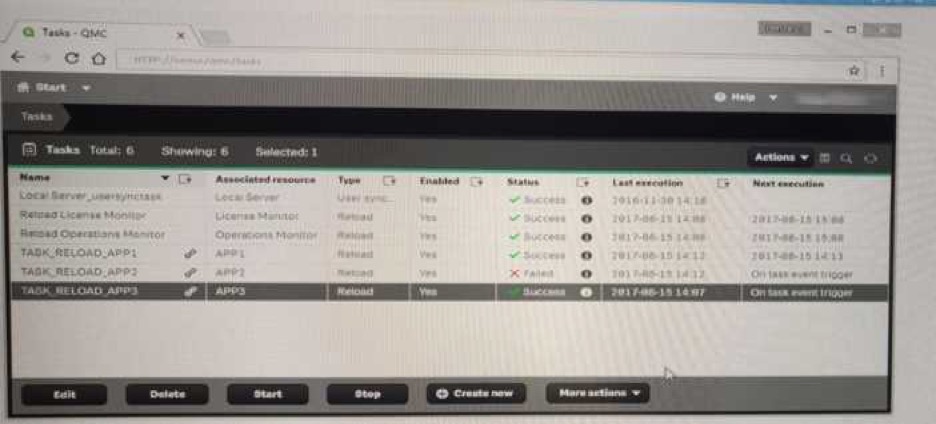
the Edit reload task screen. There are NO isse found in the Edit reload task screen. The user opens the Operations Monitor app, and the finds an error message in the Details sheet. Message from reloadprovider: Reload Failed in Engine. Check Engine or script logs The Engine log did NOT provide any reason for the failure? Which is the most efficient methods to the cause of this issue? A contentAdmin user discover TASK_RELOAD_APP2 fails.The user double cliks the Failed task to open
to join the discussion
No discussions yet. Be the first to ask!
Delete Comment
Are you sure? This action cannot be undone.
Finish Practice?
Are you sure you want to finish? This will end your practice session.